MENU

What is a Thread in Java?

A thread in Java is a lightweight path of execution that allows multiple tasks to be executed concurrently or we can say in parallel within a single program. Threads provide a way to divide a program into smaller, independent units of execution, each of which can run in parallel with other threads.


In above diagram we can see that a Main thread and several default threads(Garbage collector, Finalizer, Reference Handler, Signal Dispatcher) are running in parallel apart from user defined thread. 
The Java Virtual Machine (JVM) creates a main thread when a Java program starts running in order to execute the main() method of the program.

The main() method is the entry point of a Java program and is the first method that is executed when the program starts running. The JVM creates a new thread specifically to execute the main() method so that the program's execution does not block other threads or the operating system itself.

The main thread runs in the foreground and is responsible for executing the main logic of the program. It may create additional threads as needed to handle specific tasks, but the main thread remains the primary thread of execution throughout the program's lifetime.

By creating a separate thread for the main() method, the JVM is able to provide a secure and stable environment for the program to run in, as well as ensuring that the program's execution does not interfere with the operation of the operating system or other programs running on the same system.

Why do we use threads in Java?

Threads in Java are used to improve the performance of a program by allowing it to perform multiple tasks simultaneously. They can be used to execute time-consuming operations in the background while the main program continues to run, or to improve the responsiveness of user interfaces by keeping them from freezing while waiting for a long-running task to complete.

Improved performance: Threads can improve the performance of an application by allowing multiple tasks to be executed simultaneously. This can be especially useful for applications that perform I/O operations or run long-running tasks that would otherwise block the main thread of execution.


Improved responsiveness: By executing tasks concurrently, threads can improve the responsiveness of an application, allowing it to handle user input and respond to events quickly.


Resource sharing: Threads allow multiple tasks to share resources such as memory, CPU, and I/O devices, reducing the overall resource usage and improving the efficiency of the application.


Modularity: Threads can be used to break down a large task into smaller sub-tasks, each executed by a separate thread. This can make the application more modular and easier to manage


When do we use threads in Java?

Handling multiple concurrent tasks: When a program needs to handle multiple tasks concurrently, such as processing user input while performing network I/O or updating a GUI, threads can be used to execute each task in parallel. For example, a web server may use threads to handle multiple client connections simultaneously.

Improving performance: Threads can be used to improve the performance of a program by allowing it to perform multiple CPU-bound tasks in parallel, such as performing complex calculations or sorting large data sets. This can reduce the overall time it takes to complete a task.

Managing background operations: Threads can be used to run background operations, such as performing periodic maintenance or cleaning up unused resources, without blocking the main thread of the program.

Handling user input: Threads can be used to handle user input, such as processing mouse and keyboard events, without blocking the main thread of the program and causing it to become unresponsive.

Asynchronous programming: Threads can be used for asynchronous programming, such as executing a long-running task in the background and notifying the main thread when it completes.

In simple wording. We should be more conscious while creating a thread, It is because thread creation and switching between multiple threads increase the linked with the cost. 

How do you create a thread in Java?

In Java, there are two ways to create threads: by extending the Thread class, or by implementing the Runnable interface. Here are the basic steps to create a thread using each approach:

1. Extend thread class

public class MessageSender extends Thread {

          @Override 

            public void run() { 

                    // Code to be executed in the thread 

            }

 }


// Create instance for MessageSender, which will be working as a Thread

MessageSender messageSender = new MessageSender();

// By calling start method thread start execution of run() method  

messageSender.start();


2. Implementing the Runnable interface

Create a new class that implements the Runnable interface. This class should define a run() method, which contains the code that the thread will execute. Object of Class implementing Runnable will not be directly act as thread itself, we must give this instance to Thread instance. 


public class MessageSender extends Thread {
            @Override 
              public void run() { 
                     // Code to be executed in the thread 
              
 }

// Create instance
MessageSender messageSender = new MessageSender();
// Run the thread 
messageSender.start();


Thread Life cycle


Lets see all those states in more details


Thread memory model 

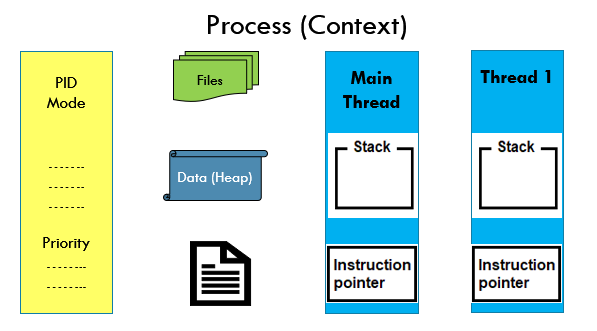
Thread is the part of some process before getting to know about thread lets have a look on process memory model. 


Process can have multiple thread as we already discussed. One default thread always will be created named Main Thread. As many thread we will be creating it will be creating separate thread space for all threads. As depicted in above diagram. 

Heap memory is shared with all threads and other resources as well. Lets see structure of Thread memory 


Thread ID: 

Each thread is assigned a unique identifier (ID) when it is created, which can be obtained using the getId() method. Thread ID is a useful tool for developers in debugging, synchronization, performance monitoring, and thread management.

Thread name: 

Threads can be assigned a name when they are created, which can be obtained and set using the getName() and setName() methods.

Thread priority: 

Threads can be assigned a priority level, which determines the order in which they are executed relative to other threads. Thread priorities can be set and adjusted using methods provided by the Thread class, such as setPriority() and getPriority().

Thread group: 

Threads can be organized into groups using the ThreadGroup class, which provides methods for managing the threads in a group.


In Java, a thread's code and program counter are two key components that determine what the thread is executing and where it is in the execution process.


Code: 

The code of a thread refers to the set of instructions that it is currently executing. In Java, a thread's code is represented by the bytecodes of the methods it is executing, which are stored in the program's memory.

Program counter: 

The program counter (PC) is a special register that keeps track of the current instruction being executed by the thread. Each time the thread executes an instruction, the program counter is incremented to point to the next instruction. The program counter is also used to handle branching and looping constructs in the code.

Note : Together, the code and program counter determine what the thread is doing at any given moment, and they are used by the Java Virtual Machine (JVM) to manage thread execution. When a thread is created, it starts executing code from the beginning of a designated method. As the thread executes each instruction, the program counter is incremented to point to the next instruction, until the thread completes the method or is interrupted.

Lets have detailed look on how java program get executed 


When a Java program is executed, the Java Virtual Machine (JVM) loads the program and runs the main thread by following these steps:

Loading: 

The JVM loads the class files that make up the Java program. This involves finding and reading the bytecode of each class file and storing it in memory. The JVM verifies that the bytecode is valid and does not violate any security constraints.

Linking: 

The JVM links the class files together to form a single cohesive program. This involves resolving any references between classes and verifying that the program is internally consistent.


Initialization:

The JVM initializes the program by executing the static initializer blocks of each class in the program. This involves running any static code that is part of the class definition, such as initializing static variables or performing other setup tasks.


Execution: 

Finally, the JVM starts executing the main thread of the program by invoking the main method of the class specified on the command line. The main method is the entry point for the program and is the first method to be executed.

What is BigQuery

Bigquery is a serverless Data warehouse (no need to worry about compute) whereas Databricks is a platform to run spark (compute) on any storage(AWS, GCP, Azure). BigQuery is mostly used for reporting, dashboards where Databricks is used for ETL Pipelines, ML pipelines, Advanced analytics etc.

Note:  BigQuery is actually not traditional data warehouse either where compute and storage are coupled. I would say delta lake being a more complete solution and support open file format Parquet.


What is Delta Lake ?

The Databricks Lakehouse Platform combines the best elements of data lakes and data warehouses to deliver the reliability, strong governance and performance of data warehouses with the openness, flexibility and machine learning support of data lakes.


This unified approach simplifies your modern data stack by eliminating the data silos that traditionally separate and complicate data engineering, analytics, BI, data science and machine learning. It’s built on open source and open standards to maximize flexibility. And, its common approach to data management, security and governance helps you operate more efficiently and innovate faster.


Delta Lake vs BigQuery :   

    • Databricks Lakehouse Platform (Unified Analytics Platform) is rated higher in 1 area: Professional Services .
    • Google BigQuery is rated higher in 4 areas: Likelihood to Recommend, Usability, Support Rating, Contract Terms and Pricing Model .


Databricks on Google Cloud is a jointly developed service that allows you to store all your data on a simple, open lakehouse platform that combines the best of data warehouses and data lakes to unify all your analytics and AI workloads. Tight integration with Google Cloud Storage, BigQuery and the Google Cloud AI Platform enables Databricks to work seamlessly across data and AI services on Google Cloud.


Data Lakehouse: The best of both worlds in one platform:

A data lakehouse unifies the best of data warehouses and data lakes in one simple platform to handle all your data, analytics and AI use cases. It’s built on an open and reliable data foundation that efficiently handles all data types and applies one common security and governance approach across all of your data and cloud platforms.


How to read from and write to Google BigQuery tables in Databricks.?


HTML

Hyper Text Markup Language.


Author note:-

Throughout this tutorial we are not only going to take a lot of practice, instead, but we will also focus on giving you practical skills to build your first website. In this frontend course, you will surely get a piece of good knowledge about what we have mentioned in the previous page like all Popular libraries, webmaster, how to create a proper sitemap to give the user a good experience, how to get revenue from the website, what kind of hosting are available in the market And what service is best for a specific project website, and at the end of this journey, you will have a lot of projects in your hands.


Why HTML?

HTML For A Web Page. A web application. A Static Website. A Simple Portfolio. A Blog.


Difference Between HTML and HTML5 :

HTML5 is the fifth version of HTML. Many elements are removed or modified from HTML5.

If we want to understand what exactly changed in this new version, we have in the table below almost everything that really matters to us as a big

HTML HTML5
It works with all old browsers. It supported by all new browser like Firefox, Mozilla, Chrome, Safari, etc
Elements like nav, header were not present. New element for web structure like nav, header, footer etc.
Older version of HTML are less mobile-friendly. HTML5 language is more mobile-friendly.
Does not allow JavaScript to run in browser. This is possible due to JS Web worker API in HTML5.


HTML Editors


  • Notepad
  • Notepad++
  • Sublime Text 3
  • VS code

We have many editors present in the market it's up to you which one you liked, My Suggestion is to use a visual code editor for better understanding and for to get a web developer experience. Next, we will discuss the Construction of an HTML Page. See you there...


According to QWIKLABS:  When you complete this activity, you can earn the badge displayed above! View all the badges you have earned by visiting your profile page. Boost your cloud career by showing the world the skills you have developed!


Lab Name Lab Code Lab Link Youtube Link
AI Platform: Qwik Start GSP076 https://google.qwiklabs.com/focuses/581?parent=catalog https://youtu.be/9DA-6sLh8D8
Google Cloud Speech API: Qwik Start GSP119 https://google.qwiklabs.com/focuses/588?parent=catalog #
Cloud Natural Language API: Qwik Start GSP097 https://google.qwiklabs.com/focuses/582?parent=catalog https://youtu.be/yi0xmHsYGVI
Entity and Sentiment Analysis with the Natural Language API GSP038 https://google.qwiklabs.com/focuses/1843?parent=catalog https://youtu.be/ZLx6ewre9ro
Speech to Text Transcription with the Cloud Speech API GSP048 https://google.qwiklabs.com/focuses/2187?parent=catalog #


According to QWIKLABS:  Big data, machine learning, and scientific data? It sounds like the perfect match. In this advanced-level quest, you will get hands-on practice with GCP services like Big Query, Dataproc, and Tensorflow by applying them to use cases that employ real-life, scientific data sets. By getting experience with tasks like earthquake data analysis and satellite image aggregation, Scientific Data Processing will expand your skill set in big data and machine learning so you can start tackling your own problems across a spectrum of scientific disciplines.


Lab Name Lab Code Lab Link Youtube Link
Introduction to SQL for BigQuery and Cloud SQL GSP281 https://google.qwiklabs.com/focuses/2802?parent=catalog https://youtu.be/l-2b0HCO8iI
Rent-a-VM to Process Earthquake Data GSP008 https://google.qwiklabs.com/focuses/1846?parent=catalog https://youtu.be/ayI_M_8aKWQ
Weather Data in BigQuery GSP009 https://google.qwiklabs.com/focuses/609?parent=catalog https://youtu.be/pJf4E3LpCuc
Distributed Image Processing in Cloud Dataproc GSP010 https://google.qwiklabs.com/focuses/5834?parent=catalog https://youtu.be/yIcyTpE5Pmc
Analyzing Natality Data Using AI Platform and BigQuery GSP012 https://google.qwiklabs.com/focuses/604?parent=catalog #
Predict Baby Weight with TensorFlow on AI Platform GSP013 https://google.qwiklabs.com/focuses/607?parent=catalog https://youtu.be/UZyBa3vWIJw


According to QWIKLABS:  Learn best practices to Extract, Transform, and Load your data into Google Cloud with BigQuery. In this series of interactive labs you will create and optimize your own data warehouse using a variety of large-scale BigQuery public datasets. BigQuery is Google's fully managed, NoOps, low cost analytics database. With BigQuery you can query terabytes and terabytes of data without having any infrastructure to manage or needing a database administrator. BigQuery uses SQL and can take advantage of the pay-as-you-go model.


Lab Name Lab Code Lab Link Youtube Link
BigQuery: Qwik Start - Command Line GSP071 https://google.qwiklabs.com/focuses/577?parent=catalog #
Creating a Data Warehouse Through Joins and Unions GSP413 https://google.qwiklabs.com/focuses/3640?parent=catalog #
Creating Date-Partitioned Tables in BigQuery GSP414 https://google.qwiklabs.com/focuses/3694?parent=catalog #
Troubleshooting and Solving Data Join Pitfalls GSP412 https://google.qwiklabs.com/focuses/3638?parent=catalog #
Working with JSON, Arrays, and Structs in BigQuery GSP416 https://google.qwiklabs.com/focuses/3696?parent=catalog #
Build and Execute MySQL, PostgreSQL, and SQLServer to Data Catalog Connectors GSP814 https://google.qwiklabs.com/focuses/11999?parent=catalog #

According to QWIKLABS:  Cloud SQL is a fully managed database service that stands out from its peers due to high performance, seamless integration, and impressive scalability. In this fundamental-level quest, you will receive hands-on practice with the basics of Cloud SQL and quickly progress to advanced features, which you will apply to production frameworks and application environments. From creating instances and querying data with SQL, to building Deployment Manager scripts and highly available databases that run on GKE containers, Cloud SQL will give you the knowledge and experience needed so you can start integrating this service right away.


Lab Name Lab Code Lab Link Youtube Link
Introduction to SQL for BigQuery and Cloud SQL GSP281 https://google.qwiklabs.com/focuses/2802?parent=catalog https://youtu.be/l-2b0HCO8iI
Cloud SQL for MySQL: Qwik Start GSP151 https://google.qwiklabs.com/focuses/936?parent=catalog #
Loading Data into Google Cloud SQL GSP196 https://google.qwiklabs.com/focuses/1157?parent=catalog #
Cloud SQL with Terraform GSP234 https://google.qwiklabs.com/focuses/1215?parent=catalog #
Using Ruby on Rails with Cloud SQL for PostgreSQL GSP109 https://google.qwiklabs.com/focuses/1854?parent=catalog #
APIs Explorer: Cloud SQL GSP423 https://google.qwiklabs.com/focuses/3685?parent=catalog #
Connect to Cloud SQL from an Application in Kubernetes Engine GSP449 https://google.qwiklabs.com/focuses/5625?parent=catalog #

According to QWIKLABS:  This advanced-level quest is unique amongst the other Qwiklabs offerings. The labs have been curated to give IT professionals hands-on practice with topics and services that appear in the Google Cloud Certified Professional Data Engineer Certification. From Big Query, to Dataprep, to Cloud Composer, this quest is composed of specific labs that will put your Google Cloud data engineering knowledge to the test. Be aware that while practice with these labs will increase your skills and abilities, you will need other preparation, too. 


Lab Name Lab Code Lab Link Youtube Link
Creating a Data Transformation Pipeline with Cloud Dataprep GSP430 https://google.qwiklabs.com/focuses/4415?parent=catalog https://youtu.be/p3m9gH7i8oM
Building an IoT Analytics Pipeline on Google Cloud GSP088 https://google.qwiklabs.com/focuses/605?parent=catalog https://youtu.be/TQ4FPxzu00s
ETL Processing on Google Cloud Using Dataflow and BigQuery GSP290 https://google.qwiklabs.com/focuses/3460?parent=catalog https://youtu.be/Zdp42ZaQcTk
Predict Visitor Purchases with a Classification Model in BQML GSP229 https://google.qwiklabs.com/focuses/1794?parent=catalog https://youtu.be/d_1UvIUPokU
Predict Housing Prices with Tensorflow and AI Platform GSP418 https://google.qwiklabs.com/focuses/3644?parent=catalog https://youtu.be/CTFnfXQt9IY
Cloud Composer: Copying BigQuery Tables Across Different Locations GSP283 https://google.qwiklabs.com/focuses/3528?parent=catalog #